Minute · Own product · Android & iOS · 2026
(00) Overview
Scores in place of one
Platforms, one codebase
Weeks to Google Play
Data collected
Role
Product designer
Product owner
QA
Team
Me + an AI coding agent
(Claude) as the engineer
Platform
Android & iOS
English & Russian


(01) How it started
My friend visited a psychologist and told me that it would be nice to have an app which helps to describe thoughts in a defined key (situation, thought, emotion, reaction) and to track how you feel somehow: energy, body, mood. That was a task from her psychologist session, and for me that was kind of the point to start from. Minute is a tool to notice your state day by day and come to a session with real notes. Therapists also find it easier to work when there is data to refer to.
(02) Problem
01
You forget in the moment
Nothing reminds you to write things down while they happen.
02
One score hides too much
A single “mood” number hides the difference between being tired and being sad.
03
A blank page is hard
The CBT thought-diary method is hard to follow without guidance.
04
Very personal data
People don’t want to create accounts or send it to a server.
(03) Decisions
01
Three scores in place of one
Energy, body and mood, each 1–10 with an optional note. Low energy with a fine mood reads very differently from a “5/10 day”.
02
Random check-ins keep answers honest
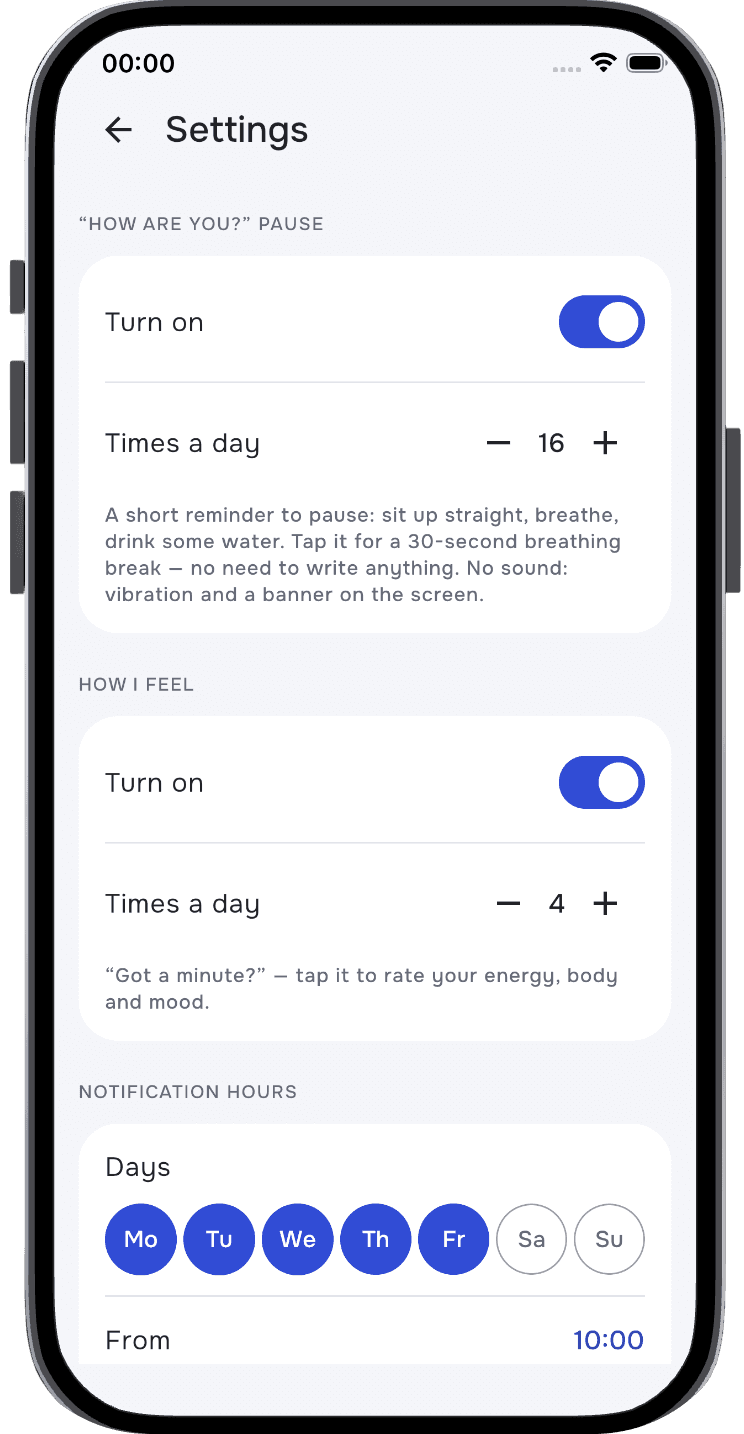
“Got a minute?” arrives 3–5 times a day at a random minute within the hours you choose, so you don’t prepare and answers stay honest.
03
Pauses, separate from check-ins
Short “How are you?” reminders open a calm half-minute breathing circle, no input needed. Never closer than 15 minutes to a check-in.
04
A guided thought diary
Situation → thought → emotions → reaction, with quick picks. Emotion strength moved from percentages to five words on a stepped slider after testing.
05
Patterns, not just entries
Charts by day, week, month or any period with the average and the range; a calendar coloured by daily average; the toughest and best day linked to their entries.
06
Late night counts as today
A day boundary (3:00 by default), so a 1 a.m. entry belongs to the evening it was part of, in charts, calendar and export.
07
Private by design
No account, no ads, no analytics, not even internet permission. Export to Excel for a therapist or a backup, restore on a new phone.
08
Two languages, one switch
RU/EN following the phone. Picked emotions and reactions are translated, the user’s own words stay as written.
(04) App map
The app is opened from three places: the icon and two kinds of notifications. Inside, everything sits under five tabs. Dialogs stay next to the screen they open from, and phone screens outside the app are marked separately.
Entry points
First launch
Event
App launch
↓ first launch
System
Allow notifications
system prompt
↓ if exact alarms are off
Dialog
Turn on exact alarms
Open → phone settings
Later → Today
Check-in
Event
Notification “Got a minute?”
3–5 times a day, at random time
↓ tap
Go to
Write how I feel
Today tab
Pause
Event
Notification “How are you?”
short reminders to pause
↓ tap
Screen
Pause
half-minute breathing circle
Done → Today
Write how I feel → check-in
Tabs
Tab · Today
Screen
Today
daily averages, today’s entries and thoughts, warning banners
↓ Write how I feel
Screen
three 1–10 scales, a note on each
Save: back to Today
Dialog · back with changes
Leave without saving?
Leave · Keep editing
↓ tap entry
Screen
Entry
view and edit
Save: back to Today
Dialog · trash
Delete entry?
Delete · Cancel
↓ Write down thoughts
Go to
Write down thoughts
Thoughts tab
↓ tap thought
Go to
Thought entry: view
Thoughts tab
↓ banner: Turn on
System
Phone settings
notifications, alarms, autostart
Tab · Thoughts
Screen
Thoughts
list of entries, search
↓ tap card
Screen
Thought entry: view
read-only
↓ pencil
Screen
Thought entry: edit
Save or Back: returns to the entry
Dialog · trash
Delete entry?
Delete · Cancel
↓ FAB
Screen
Write down thoughts
situation, thought, emotions with strength, reactions
Save: back to Thoughts
Tab · Chart
Screen
Chart
day · week · month · period; energy, body, mood
Tap toughest or best day: jumps to it
↓ tap period title
Dialog
Date picker
day or week in one tap, period with two dates
Pick a range: back to Chart
↓ tap entry
Go to
Entry
Today tab
↓ FAB
Go to
Write how I feel
Today tab
Tab · Calendar
Screen
Calendar
days coloured by daily average
Tap a day: its entries show below
↓ tap entry
Go to
Entry
Today tab
Tab · More
Bottom sheet
More
bottom sheet
↓ All entries
Screen
All entries
by day, search in notes
↓ tap entry
Go to
Entry
Today tab
↓ Settings
Screen
Settings
reminders, hours and days, day boundary, data, language, theme
↓ download / restore
System
Files / Downloads
.xlsx spreadsheet
Dialog · file picked
Restore entries?
Cancel · Restore
↓ notification switches
System
Phone settings
↓ privacy policy
System
Browser
↓ contact us
System
Dialog · no mail app
Write to us
Close · Copy address
↓ Download spreadsheet
System
Files / Downloads
Solid box — app screen or dialog
Dashed box — outside the app or a jump to another tab
Black box — tab root
↓ Orange — user action
(05) Testing
I tested every build myself on three Android phones and the iOS simulator and wrote down everything that felt off, from paddings and copy to the logic of empty states.
01
Killed in the background
On Realme (ColorOS) reminders silently stopped when the system killed the app. Now the app detects missed reminders and guides you through autostart.
02
Late alarms on Android 14+
A fresh install blocks exact alarms by default. In place of a generic warning, the app explains it once and opens exactly the right switch.
03
Feels finished
Read-only view for past thoughts with edit behind a pencil, dialogs that say what will happen, one-tap week selection, many copy fixes.
(06) AI agent
I defined the features, made the design decisions, reviewed every build on device and reported bugs with screenshots. Claude wrote the Kotlin Multiplatform code, traced bugs to their root cause, ran the tests, prepared store builds and screenshots and helped with store forms and the landing page.

(07) Design system
Built on a design system I had refined over several months for my first app: Compose components, Onest typeface, spacing scale. Recoloured for Minute with a blue primary, cool blue-grey neutrals, light and dark themes. Store visuals and the landing page designed in Figma.

(08) Result
01
Live on Google Play in about three weeks, then on the App Store
02
One codebase for Android and iOS, two languages, light and dark themes
03
Zero data collected, a strong trust point for a wellbeing app
04
Landing page in two languages
(09) Next
Collect the first feedback and Play Console data, see which screens people actually return to — charts or the thought diary — and decide what to deepen.