Brave Manager · SaaS · B2B
Building an intuitive task system
Brave Manager is a project management platform for design and product teams. Users struggled with onboarding, the kanban board lacked methodology, and task statuses were hard to track. The goal: redesign the core flow to make daily work simpler, reduce churn, and help users get value from the product faster.
10+
Hypotheses
3
User interviews
+72%
A/B uplift
27
New screens

Task
Improve usability & retention
Goals: Make the interface easier to navigate, retain more users by reducing friction, and simplify everyday workflows
Designer scope: Screens in Figma aligned with the existing design system
Problem
Two main user pains
01
Disorientation in the interface
New users had trouble navigating, exploring functionality on their own, and configuring projects
02
Ineffective kanban system
The kanban lacked methodology, and tracking task status was difficult
Process
From brief to A/B testing
Redesigning Brave Manager's core flow:
onboarding, kanban methodology, task statuses to improve usability and retention for design and product teams
Brief analysis & follow-up questions
01
Market research and competitor analysis
02
Idea generation and v.1 hypotheses
03
Studying the current user journey
04
Re-generating hypotheses based on user flow
05
User interviews
06
Building user flow incorporating analyzed data
07
Prototyping current solution and aligning with UI kit
08
Prototype testing with users
09
Refining the prototype, finalizing design solution
10
Preparing UI kit and developer handoff
11
A/B testing on a focus group
12
Analysis of test results and refinement of solutions
13
01
Disorientation in the interface
New users had trouble navigating, exploring functionality on their own, and configuring projects
02
Ineffective kanban system
The kanban lacked methodology, and tracking task status was difficult
Competitive analysis
4 leading platforms
I analyzed how mature platforms handle onboarding, kanban methodology, task creation, and time tracking
ClickUp
4.2 · 1,700+ reviews
Versatile platform with strong customization. Praised for flexibility but interface can overwhelm new joiners
Asana
4.4 · 6,000+ reviews
Praised for intuitive UI and ease of use. Limited capabilities for complex projects
Monday
4.6 · 2,400+ reviews
Strong for medium and large companies. Some find the interface dense for new users
Wrike
4.2 · 1,700+ reviews
Versatile platform with strong customization. Praised for flexibility but interface can overwhelm new joiners
Hypotheses · v.1
First round, before walkthrough
The first round of hypotheses was based on the brief and competitor patterns. Some held up after testing, others were replaced once access to the real interface was provided
01
Improve kanban with stages and visual statuses
Will raise productivity by 20%
Validated → v.2
02
AI assistant for repetitive tasks
Will cut creation time by 30%
03
Onboarding with interactive hints
Will improve retention by 15%
Validated → v.2
04
Flexible filter system
Will improve handling speed by 25%
Validated → v.2
User journey study
Key findings from prototype walkthrough
After analyzing user journey findings, I found a lot of questions and points to research further, based on direct user pain
01
"Stage" is an ambiguous concept
The entity called "Stage" was used both as a task status (research, design, dev) and a project phase. Users couldn't tell them apart, even seasoned PMs needed clarification
02
Timer behavior breaks expectations
Starting a second task's timer silently dropped the first one. Stopping required filling in a "work type" field that users had never created. Both flows interrupted real work
03
Statuses only become clear in kanban view
Users only realized "Stages" meant task statuses after switching to the kanban, a discovery that should happen during onboarding, not by accident
04
Project & task creation rigid
Project creation always required a number ID, and tasks could only be created with a name, users wanted to fill in details right away, not jump back to edit

Hypotheses · v.2
Refined after interviews
After analyzing user journey findings and 8 interviews with managers and employees, I prioritized four hypotheses for the new flow, based on direct user pain rather than assumptions
01
Rename "Stage" and clarify project setup fields
Intuitive terms during project creation will reduce average setup time by 15%
In A/B test
02
Add a global timer at the app level
An always-visible timer with quick start/stop will improve time tracking accuracy by 20% by reducing forgotten or unfinished sessions
In A/B test
03
Expand task creation with extra fields
Adding description, files, priority, deadline at creation will cut start- of-work time by 10%
In A/B test
04
Visual emphasis for high-priority tasks
Better color contrast for priority levels will reduce response time to critical tasks by 15% and overdue rate by 10%
In A/B test
User flow
Two paths: manager and employee
Brave Manager has two distinct user roles with different needs. I designed two task flows: one for managers (project creation, planning, status) and one for employees (task pickup, time tracking, status updates)
Task flow 1 · Manager
Home
main screen
click "+ Project"
New project modal
name, owner, dates, budget, statuses
fill name → create
Project · Table view
add tasks inline with all fields
click on row
Task editor
description, files, prio, date, assignee
save → switch view
switch on Kanban view
Task list
Kanban view
tasks grouped by status
go to Stages tab
Stages screen
project phases with linked tasks
go to "Projects"
All projects · kanban
cross-project overview
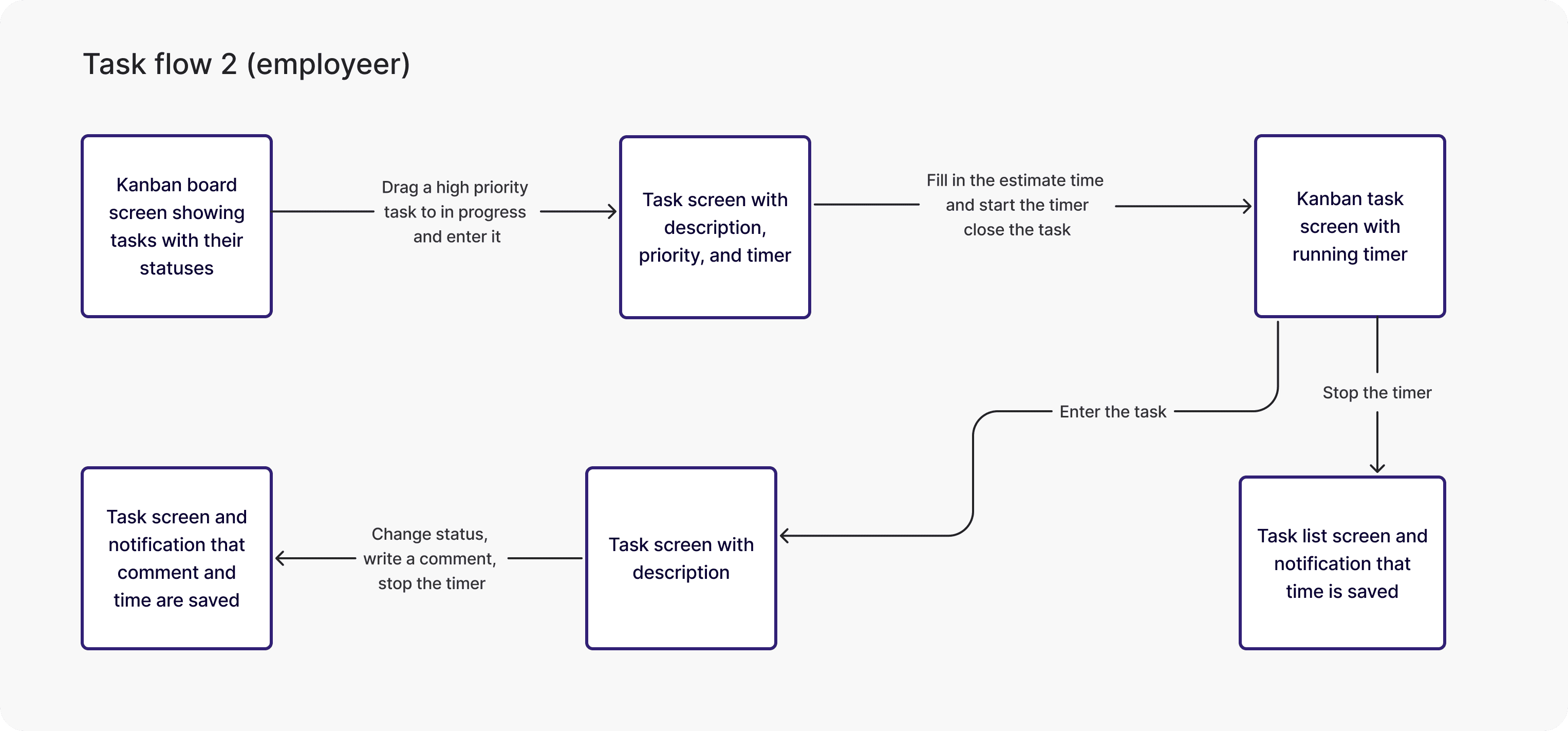
Task flow 2 · Employee
Kanban view
my tasks across projects
drag to "In progress"
Task detail screen
description, prio, global timer
log estimate → start timer
Kanban · timer running
timer visible globally in top bar
stop timer, change status
Task screen + comment
add comment, save context
close task
Task list · saved
notification: time saved
A/B Testing
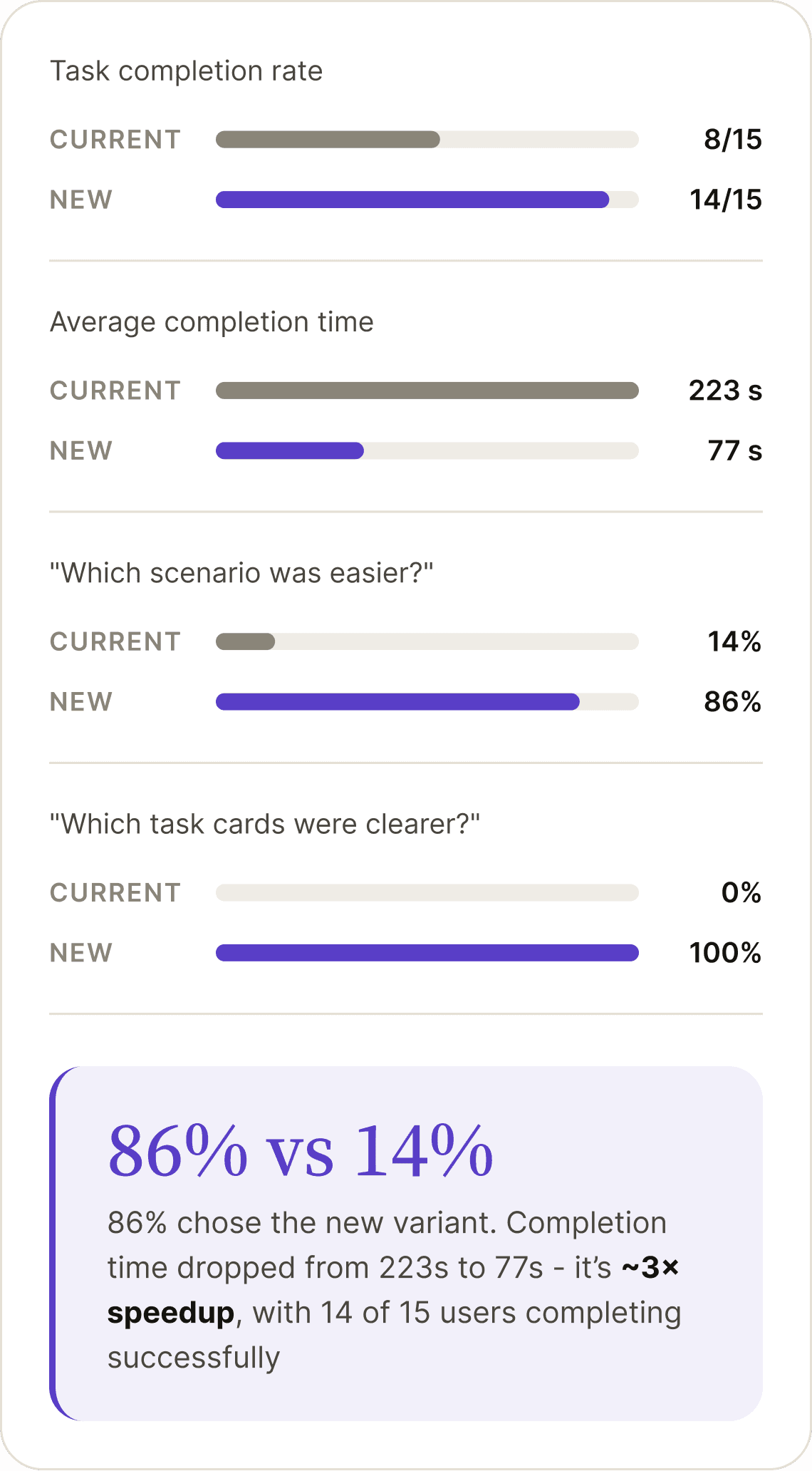
15 tests, two variants, clear winner
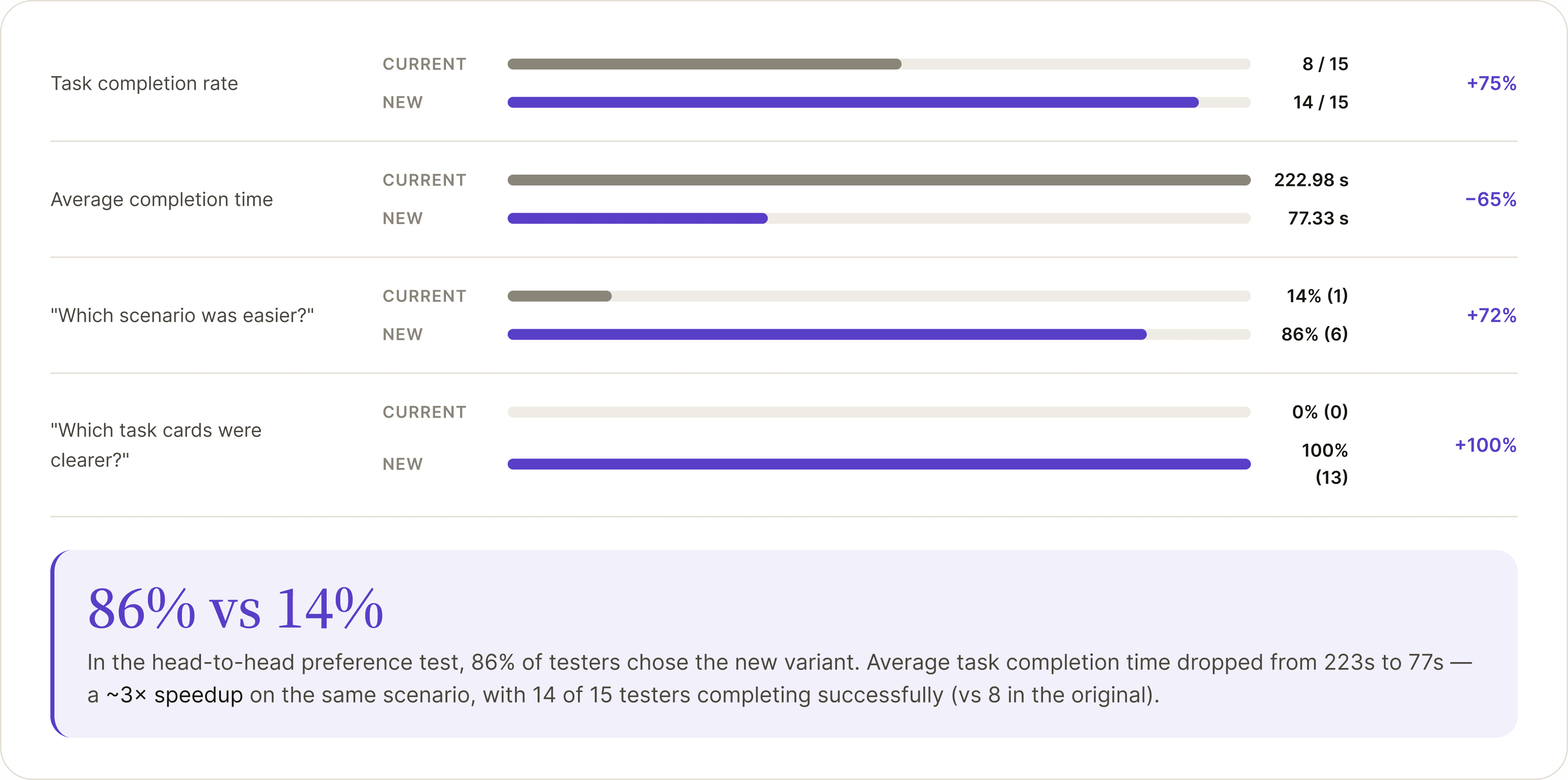
Both variants used the same task scenario: create a project, add a task with a description, run a timer, switch to kanban view, stop the timer. The new variant streamlined steps and exposed the timer globally, and the impact on task completion was substantial
Test setup
(Current vs New)
Score charts
Final results
(86% vs 14%)
Solution
Project setup, redesigned
The new project creation modal collapses what was previously a multi-step flow into a single, scannable screen with optional fields surfacing relevant defaults and clearly named status presets instead of the ambiguous "Stage" entity
Screen will be added soon...
42
screens of the current flow documented
28
screens of the redesigned flow built for testing
3
hypotheses validated through A/B testing
Brave Manager · SaaS · B2B Productivity
Building an intuitive task system
Building an intuitive task system
Brave Manager is a project management platform for design and product teams. Users struggled with onboarding, the kanban board lacked methodology, and task statuses were hard to track. The goal: redesign the core flow to make daily work simpler, reduce churn, and help users get value from the product faster.
7
Hypotheses tested
3
User interviews
+72%
A/B win rate uplift
27
New screens

10+
Hypotheses tested
3
User interviews
+72%
A/B win rate uplift
27
New screens
Task
Improve usability and retention
Goals: Make the interface easier to navigate, retain more users by reducing friction and simplify everyday workflows
Designer scope: Produce screens in Figma aligned with the existing design system, accounting for the product's functionality and team needs
Problem
Two main user pains
01
Disorientation in the interface
New users had trouble navigating, exploring functionality on their own, and configuring projects. The onboarding was steeve and unguided
02
Ineffective kanban system
The kanban lacked a clear methodology, and tracking task status was difficult, managers couldn't see at a glance where each task stood
Process
From brief to A/B testing
The project ran end-to-end: from understanding the brief and analyzing competitors, through interviews and user journey mapping, to prototyping, usability testing, and A/B validation with a focus group
01
Brief analysis and follow-up questions to the stakeholder
02
Market research and competitor analysis
03
Idea generation and v.1 hypotheses
04
Studying the current user journey
05
Re-generating hypotheses based on real product’s user flow
06
User interviews
07
Building user flow incorporating analyzed data
08
Prototyping current solution and aligning with UI kit
09
Prototype testing with users (A/B test)
10
Refining the prototype, finalizing design solution
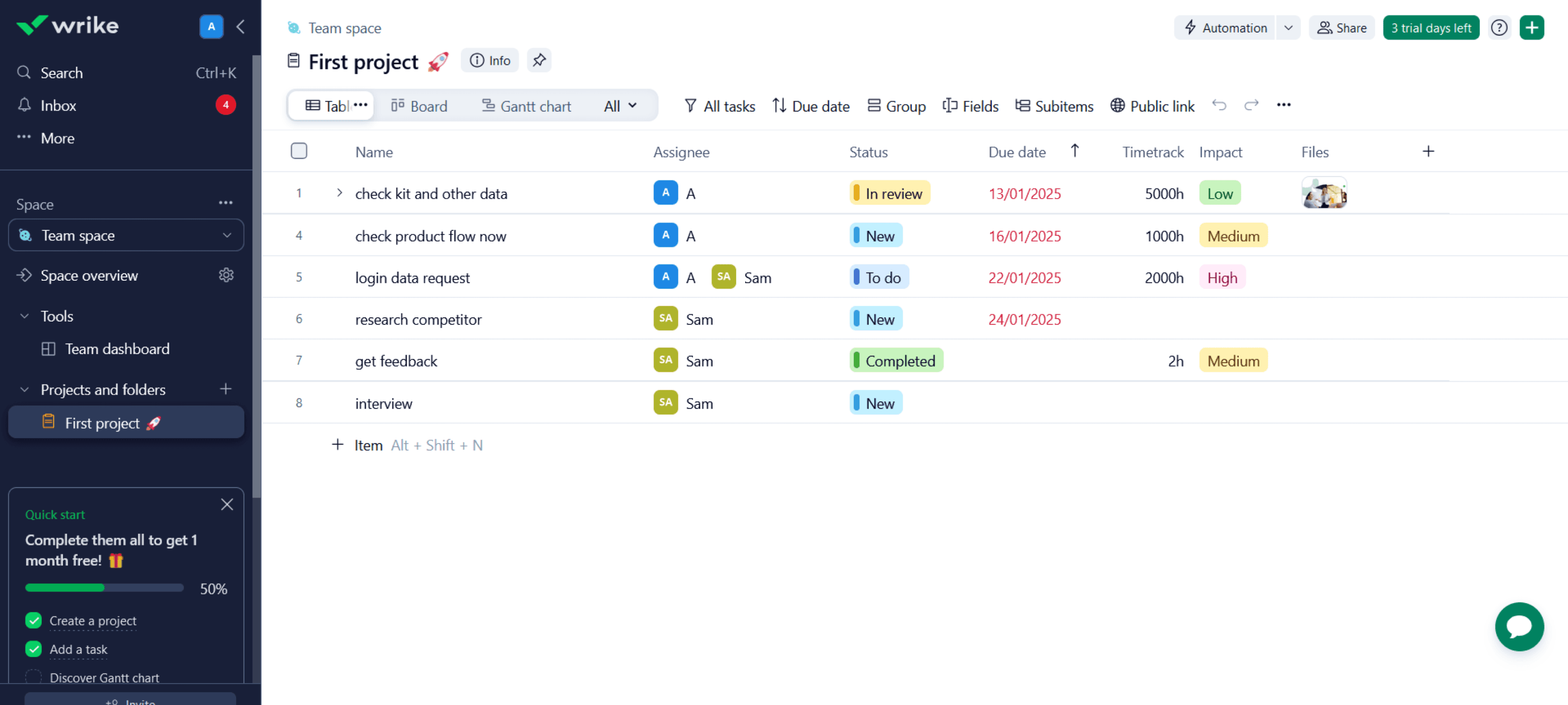
Competitive analysis
4 leading task management platforms
I analyzed how mature platforms handle onboarding, kanban methodology, task creation and time tracking. Each had strengths to learn from and weaknesses to avoid
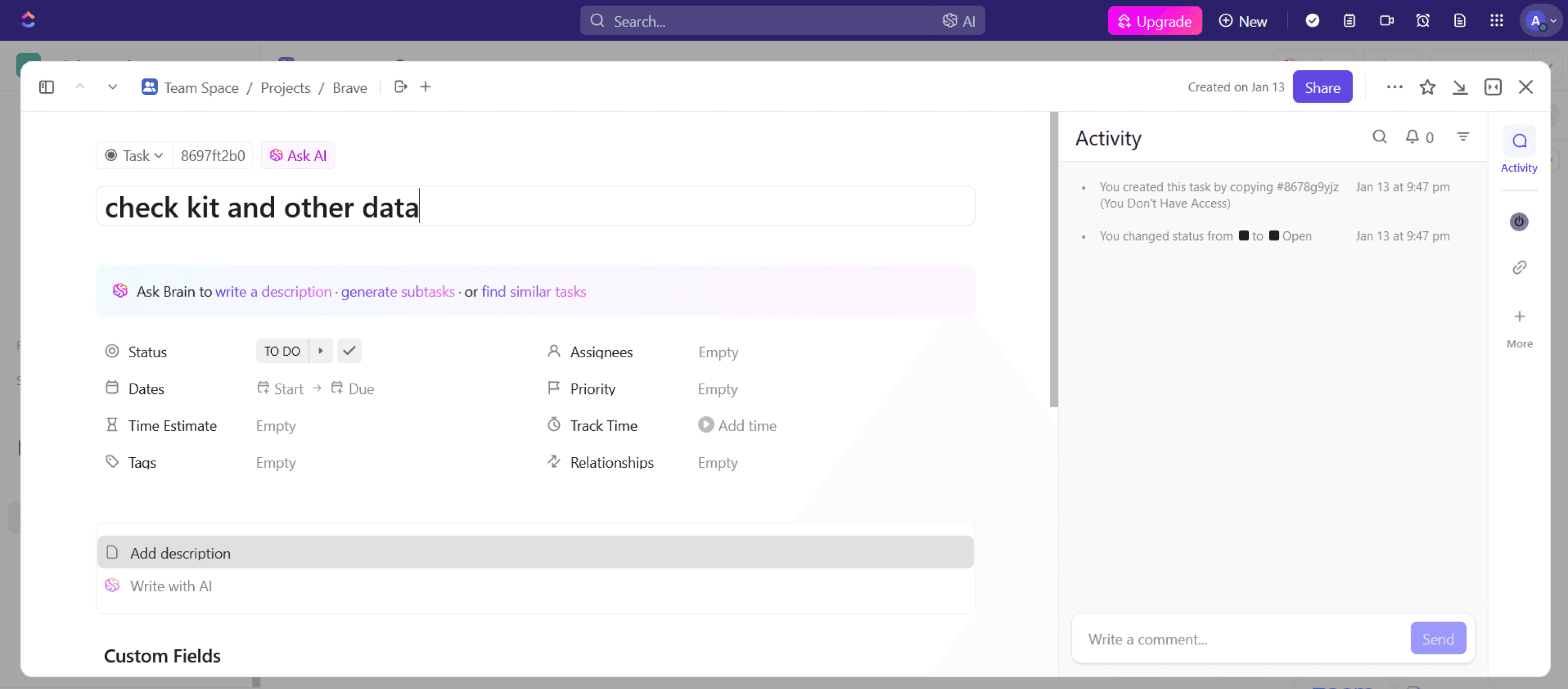
ClickUp
4.7 · 4,000+ reviews
Versatile platform with strong customization. Users praise flexibility but find the interface overwhelming for new joiners.
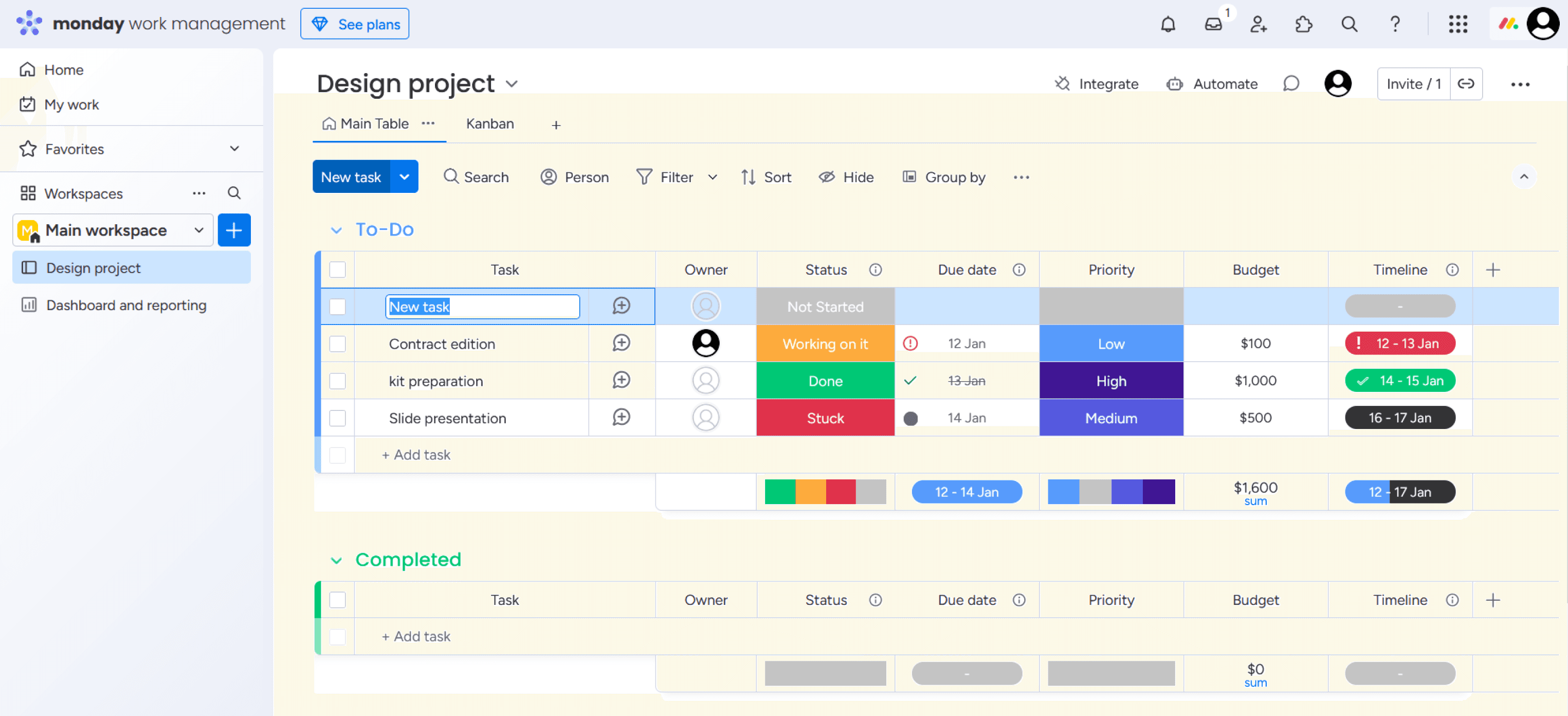
Monday
4.6 · 2,400+ reviews
Visually appealing and flexible. Users find configuration steep, but the visual planning tools are well-loved.
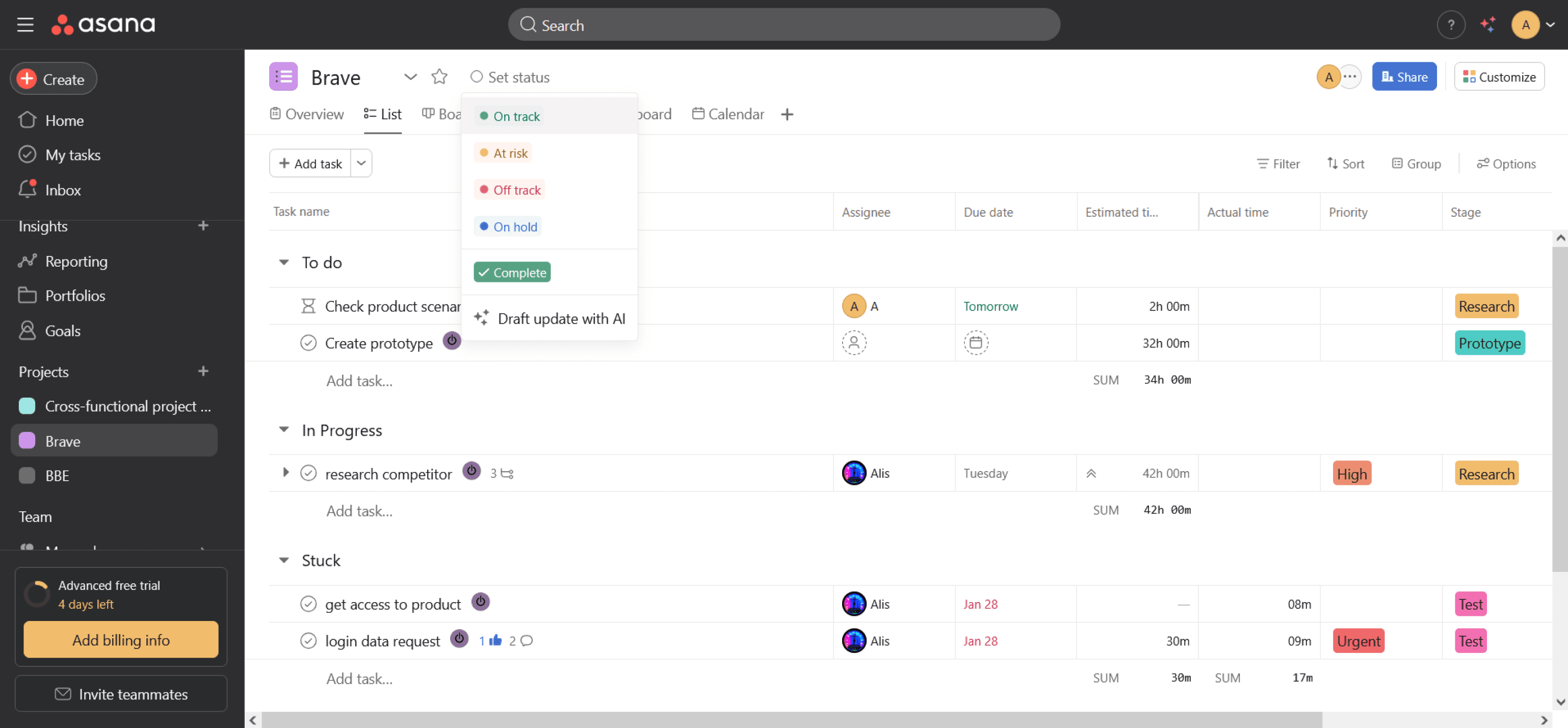
Asana
4.4 · 6,000+ reviews
Praised for intuitive UI and ease of use. Some users note limited capabilities for complex projects.
Wrike
4.2 · 1,700+ reviews
Strong for medium and large companies with broad features. Some feel the interface is dense for new users.
Hypotheses · v.1
First round, before product walkthrough
The first round of hypotheses was based on the brief and competitor patterns. Some held up after testing, others were replaced once access to the real interface was provided
01
Improve kanban with task stages and visual
statuses
Improve kanban with task stages and visual statuses
Will raise productivity by 20% by making task progress glanceable
Validated → moved to v.2
02
Add an AI assistant for repetitive task creation
Will cut task creation time by 30% via templates and smart suggestions
03
Onboarding with interactive hints
Will improve new user retention by 15% during the first week
Validated → moved to v.2
04
Flexible filter system on the kanban
Will simplify finding tasks and improve handling speed by 25%
Validated → moved to v.2
User journey study
Key findings from prototype walkthrough
After analyzing user journey findings, I found a lot of questions and points to research further, based on direct user pain
01
"Stage" is an ambiguous concept
The entity called "Stage" was used both as a task status (research, design, dev) and a project phase. Users couldn't tell them apart, even PMs needed clarification
02
Timer behavior breaks expectations
Starting a second task's timer silently dropped the first one. Stopping required filling in a "work type" field that users had never created. Both flows interrupted real work
03
Statuses only become clear in kanban view
Users only realized "Stages" meant task statuses after switching to the kanban, - a discovery that should happen during onboarding, not by accident
04
Project and task creation feels rigid
Project creation always required a number ID, and tasks could only be created with a name, but users wanted to fill in details right away, not jump back to edit

Hypotheses · v.2
Re-generating hypotheses based on product’s user flow
The second round of hypotheses was based on real user flow. Four hypotheses were added for further testing
01
Adjusting the project and task creation scenarios
Improve kanban with task stages and visual statuses
Adjusting the naming and data when creating a "Stage" to more intuitive terms will reduce the average time users spend creating projects, statuses, and tasks by 15%.
02
A continuous timer with quick start capability
Adding a global timer (at the application level) will increase time tracking accuracy by 20% by reducing the number of forgotten or unfinished timers
03
Additional fields for task creation
Adding additional fields when creating a task will shorten the overall time to start task execution by 10% by reducing the need for clarifications in the future
04
Visual highlighting for high-priority tasks
Adding visual highlighting for high-priority and urgent tasks will reduce response time to such tasks by 15% and decrease the number of overdue critical tasks by 10%
Interviews
Preparation and talking to users
I ran the interviews myself: a 10-question script covering how people track tasks, where they get stuck, how they prioritise, and what slows them down. Then I synthesised the answers into themes.
10
questions
The script moved from warm-up (“have you used task tracking? what did you like and dislike?”) into specifics: creating projects and tasks, the timer, prioritisation, cross-project boards, planning around vacations, and what feels redundant in the current system
Onboarding & clarity
“
The stages are confusing: it's not clear where the files, the description, the manager or the subscribers are
A unified board
“
We need one task board that works for both: manager and employee, filter by project, with priorities shown clearly
Priorities unreadable
“
Priorities are hard to tell apart, orange and red look the same, and there's no smart filter by priority or deadline
Timer friction
“
The timer is complicated: you can't see when it's running, it's hard to stop, and it takes extra steps
Role-based views
“
There's too much manager data for performers - budgets, history and expenses distract. Designers shouldn't see finances
Finding my work
“
There's no convenient “My Tasks” filter, it's hard to quickly find the tasks that are mine
User flow
Two paths: manager and employee
Brave Manager has two distinct user roles with different needs. I designed two task flows: one for managers (project creation, planning, status) and one for employees (task pickup, time tracking, status updates)


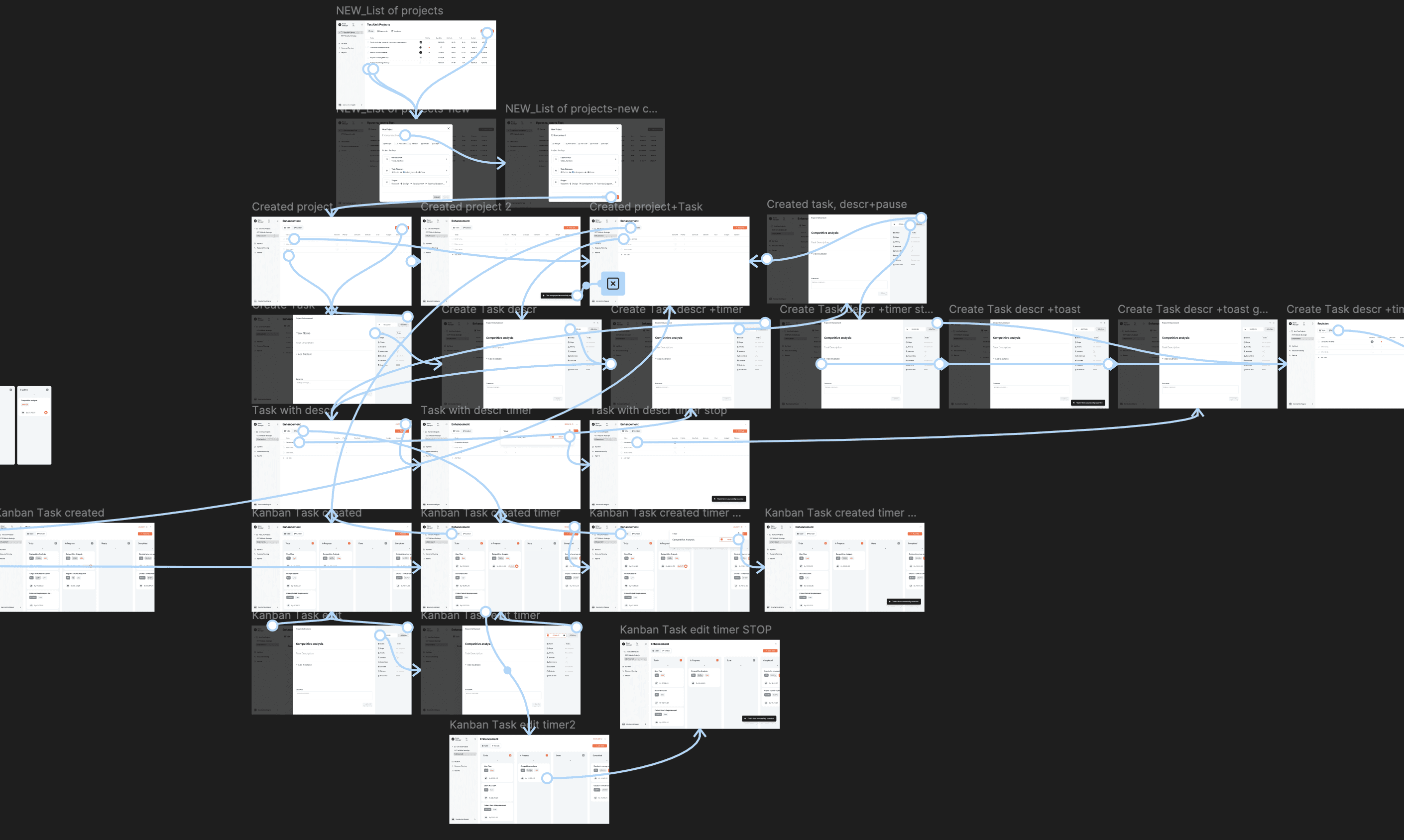
Prototyping
Prototyping current solution and aligning with UI kit
Using the existing design system, I designed 42 screens for the current flow and 27 screens for a new flow I proposed to use prototypes for A/B tests. Additionally, I extended the design system with new components, following the existing design patterns and styles

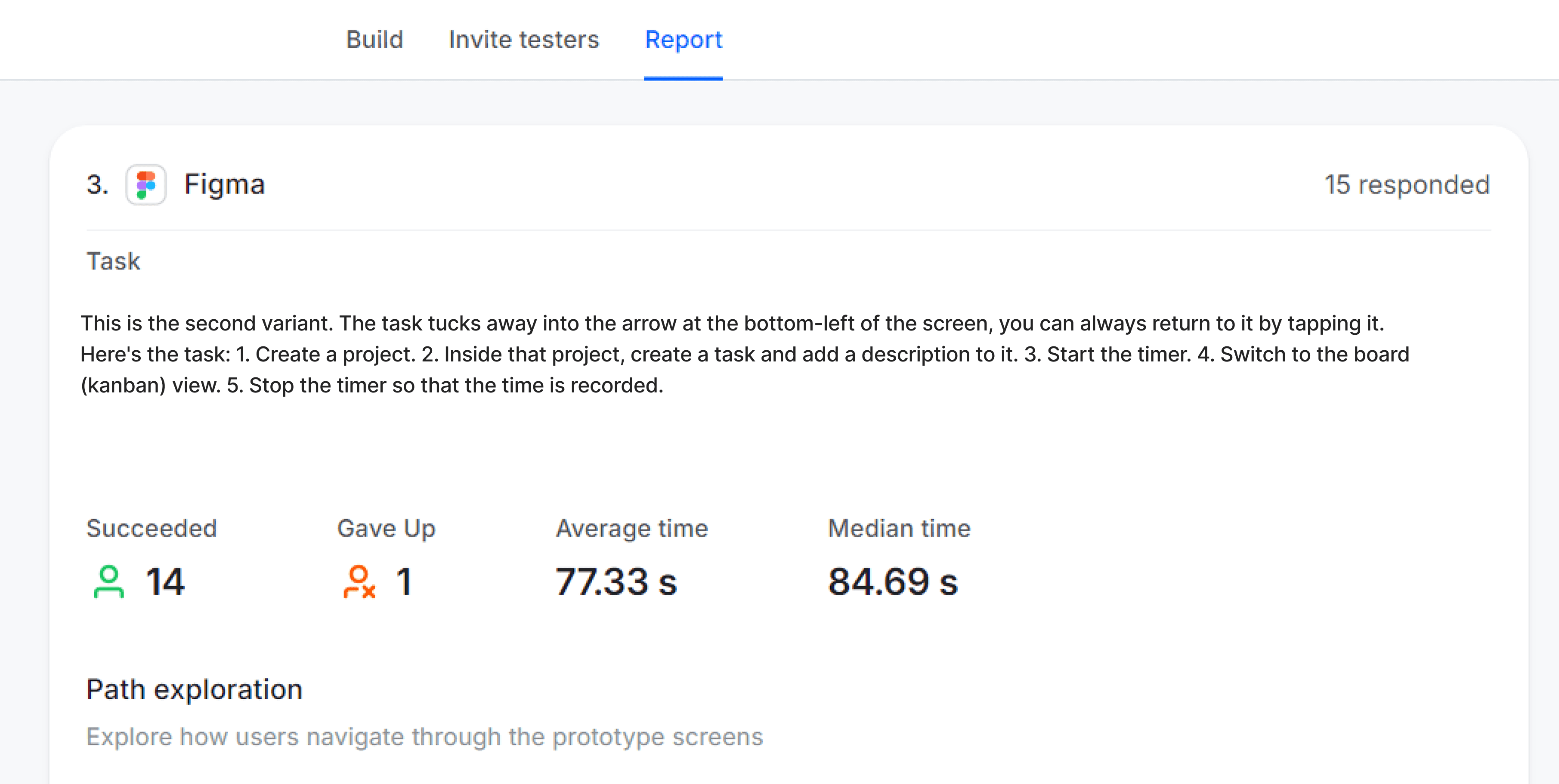
A/B Testing
15 tests, two variants, clear winner
Both variants used the same task scenario: create a project, add a task with a description, run a timer, switch to kanban view, stop the timer. The new variant streamlined steps and exposed the timer globally, and the impact on task completion was substantial
Current variant

New variant
Solution
Project setup, redesigned
The new project creation modal collapses what was previously a multi-step flow into a single, scannable screen with optional fields surfacing relevant defaults and clearly named status presets instead of the ambiguous "Stage" entity